
Platform Overview
Understanding LendFoundry's microservice architecture, LOS and LMS systems, and how they integrate to power the complete lending lifecycle
Platform Overview
Microservice ArchitectureLendFoundry's platform is built on a modern microservice architecture, providing scalable, independent services for loan origination and loan management.
LendFoundry's API platform consists of two integrated systems—the Loan Origination System (LOS) and the Loan Management System (LMS)—that work together to handle every stage of the lending lifecycle. This document provides a detailed overview of the platform architecture, microservices, and integration patterns.
Architecture Overview
LendFoundry APIs are built on a microservice-based architecture designed for scalability, reliability, and independent deployment.
Core Architecture Principles
| Principle | Implementation |
|---|---|
| Microservices | Independent services with dedicated responsibilities |
| RESTful APIs | JSON payloads over HTTP/HTTPS |
| Authentication | Bearer token (JWT) authentication |
| Scalability | Services scale independently based on load |
| Integration | Seamless data flow between LOS and LMS |
Platform Architecture
%%{init: {'theme': 'base', 'themeVariables': {'background': '#ffffff', 'mainBkg': '#ffffff', 'clusterBkg': '#f9fafb', 'clusterBorder': '#2563eb', 'titleColor': '#000000'}, 'flowchart': {'padding': 20, 'nodeSpacing': 20, 'rankSpacing': 30}}}%%
flowchart TB
    Platform[🏗️ Platform]

    Platform --> LOS
    Platform --> LMS

    subgraph LOS[📋 LOS]
        direction TB
        A1[Back Office] --> A2[Borrower]
        A2 --> A3[Affiliate]
    end

    subgraph LMS[💰 LMS]
        direction TB
        B1[App Processor] --> B2[Loan Mgmt]
        B2 --> B3[Payment]
        B3 --> B4[Business]
        B4 --> B5[Call Mgmt]
        B5 --> B6[Draw Filters]
        B6 --> B7[Loan Filters]
        B7 --> B8[Accounting]
        B8 --> B9[Draw Processor]
    end

    style Platform fill:#2563eb,stroke:#1e40af,color:#fff
    style A1 fill:#2563eb,stroke:#1e40af,color:#fff
    style A2 fill:#2563eb,stroke:#1e40af,color:#fff
    style A3 fill:#2563eb,stroke:#1e40af,color:#fff
    style B1 fill:#059669,stroke:#047857,color:#fff
    style B2 fill:#2563eb,stroke:#1e40af,color:#fff
    style B3 fill:#2563eb,stroke:#1e40af,color:#fff
    style B4 fill:#2563eb,stroke:#1e40af,color:#fff
    style B5 fill:#2563eb,stroke:#1e40af,color:#fff
    style B6 fill:#2563eb,stroke:#1e40af,color:#fff
    style B7 fill:#2563eb,stroke:#1e40af,color:#fff
    style B8 fill:#2563eb,stroke:#1e40af,color:#fff
    style B9 fill:#2563eb,stroke:#1e40af,color:#fff
Loan Origination System (LOS) Architecture
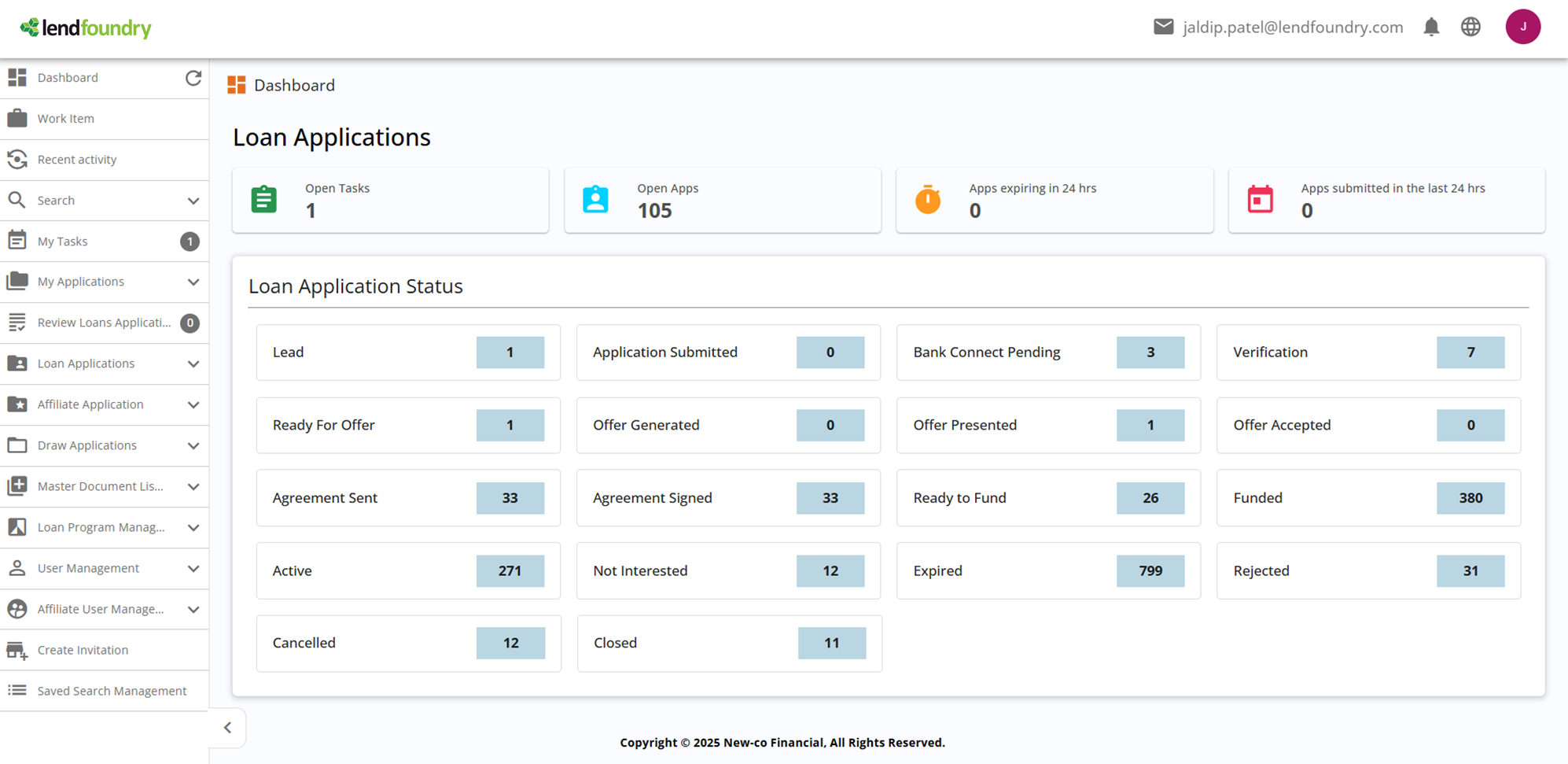
The Loan Origination System (LOS) handles the complete application journey from initial submission through final decision. LOS provides three distinct API portals, each serving different user types and use cases.
Screenshot: LOS DashboardThe LOS dashboard provides a comprehensive view of the loan origination system interface.
LOS Base URL
https://loc.demo.kendra.lendfoundry.com/v1LOS Microservices (Portals)
LOS is organized into three API portals, each accessible through dedicated endpoints:
| Portal | Base URL | Purpose | Use Cases |
|---|---|---|---|
| Back Office API | /darbaan/back-office/rest/api | Internal operations | Application management, verification workflows, decision making |
| Borrower Portal API | /darbaan/borrower/rest/api | Borrower self-service | Application submission, document upload, status tracking |
| Affiliate API | /darbaan/affiliate/rest/api | Partner integrations | Third-party application submission, referral management |
LOS Architecture Diagram
%%{init: {'theme': 'base', 'themeVariables': {'background': '#ffffff', 'mainBkg': '#ffffff', 'clusterBkg': '#f9fafb', 'clusterBorder': '#2563eb', 'titleColor': '#000000'}, 'flowchart': {'padding': 20, 'nodeSpacing': 40}}}%%
flowchart TB
    subgraph LOS[📋 LOS Architecture]
        A[🌐 Gateway] --> B[Back Office]
        A --> C[Borrower]
        A --> D[Affiliate]
        B --> E[Applications]
        C --> E
        D --> E
        E --> F[Verifications]
        F --> G[Decisions]
    end

    style A fill:#6b7280,stroke:#4b5563,color:#fff
    style B fill:#2563eb,stroke:#1e40af,color:#fff
    style C fill:#2563eb,stroke:#1e40af,color:#fff
    style D fill:#2563eb,stroke:#1e40af,color:#fff
    style E fill:#2563eb,stroke:#1e40af,color:#fff
    style F fill:#2563eb,stroke:#1e40af,color:#fff
    style G fill:#6b7280,stroke:#4b5563,color:#fff
LOS Capabilities:
- Back Office - Internal staff operations, application review, manual verification
- Borrower - Self-service portal for borrowers to submit and track applications
- Affiliate - Partner integration portal for third-party referrals
Loan Management System (LMS) Architecture
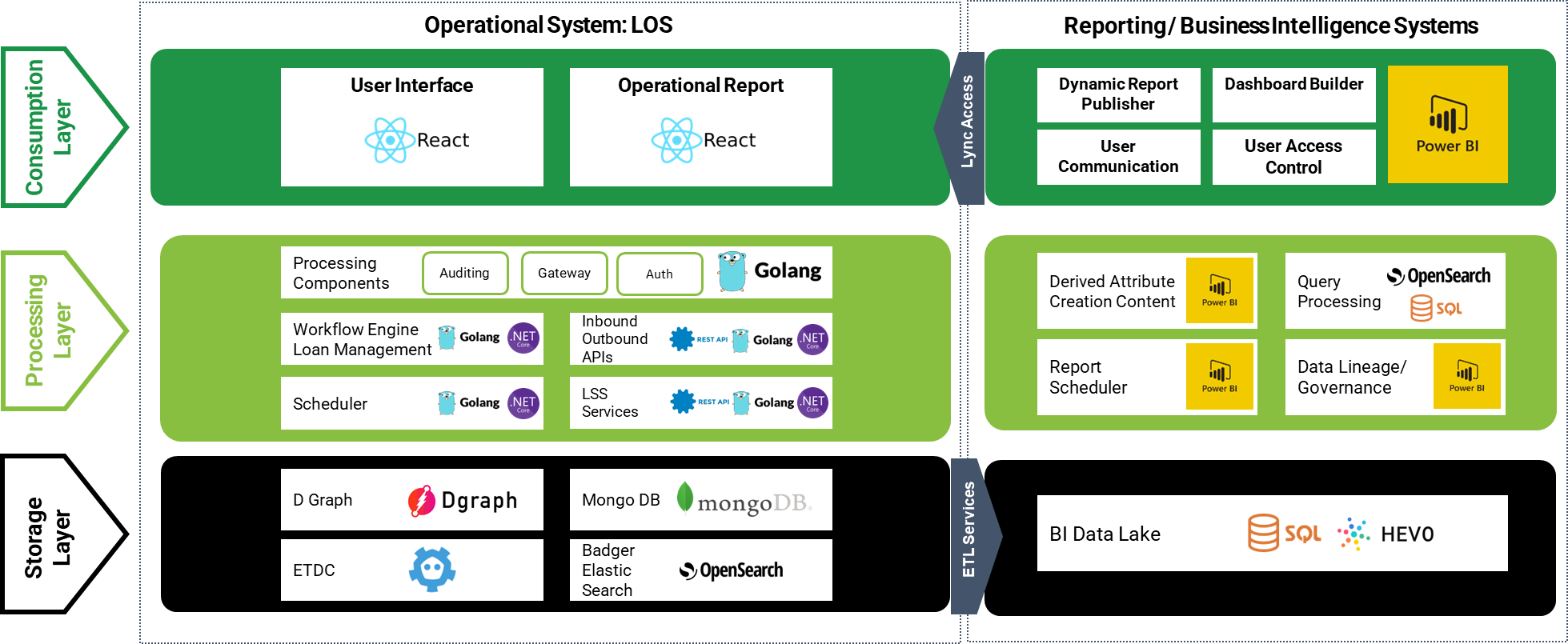
The Loan Management System (LMS) handles all aspects of loan servicing from funding through payoff. LMS is built on a distributed microservice architecture with nine independent services.
Screenshot: LMS DashboardThe LMS dashboard provides a comprehensive view of the loan management system interface.

LMS Base URL
https://api.demo.lms.lendfoundry.com/v1LMS Microservices
LMS consists of nine microservices, each handling specific aspects of loan management:
| Microservice | Base Path | Purpose | Key Capabilities |
|---|---|---|---|
| lms-application-processor | /lms-application-processor | Loan onboarding | Onboard approved loans from LOS, workflow automation |
| loan-management | /loan-management | Core loan operations | Loan CRUD, status management, modifications, escrow |
| payment-processor | /payment-processor | Payment handling | Payment processing, scheduling, reversals, auto-pay |
| business-applicant-global | /business-applicant-global | Business/applicant data | Applicant management, addresses, contacts |
| call-management | /call-management | Call/communication tracking | Call notes, communication history |
| business-draw-down-filters | /business-draw-down-filters | LOC draw management | Draw request filtering and validation |
| loan-filters | /loan-filters | Search and filtering | Advanced loan search, filtering operations |
| loan-accounting | /loan-accounting | Financial accounting | Transactions, balances, accounting entries |
| business-draw-down-processor-global | /business-draw-down-processor-global | Draw processing | Process and fund LOC draw requests |
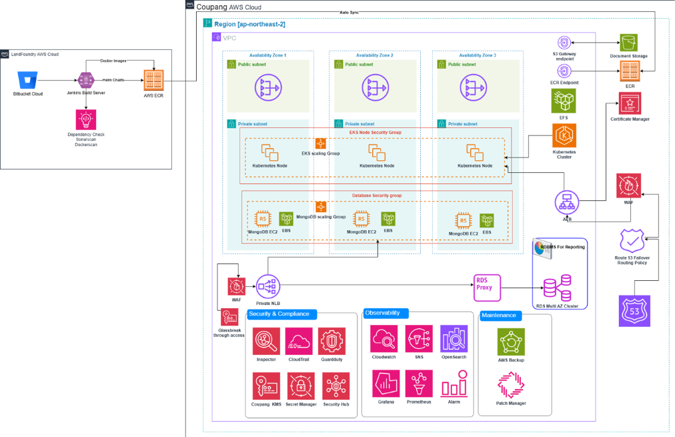
LMS Architecture Diagram
%%{init: {'theme': 'base', 'themeVariables': {'background': '#ffffff', 'mainBkg': '#ffffff', 'clusterBkg': '#f0fdf4', 'clusterBorder': '#059669', 'titleColor': '#000000'}, 'flowchart': {'padding': 20, 'nodeSpacing': 35}}}%%
flowchart TB
    subgraph LMS[💰 LMS Architecture]
        A[🌐 Gateway] --> B[App Processor]
        A --> C[Loan Mgmt]
        A --> D[Payment]
        A --> E[Business]
        A --> F[Call Mgmt]
        A --> G[Draw Filters]
        A --> H[Loan Filters]
        A --> I[Accounting]
        A --> J[Draw Processor]
    end

    style A fill:#6b7280,stroke:#4b5563,color:#fff
    style B fill:#059669,stroke:#047857,color:#fff
    style C fill:#2563eb,stroke:#1e40af,color:#fff
    style D fill:#2563eb,stroke:#1e40af,color:#fff
    style E fill:#2563eb,stroke:#1e40af,color:#fff
    style F fill:#2563eb,stroke:#1e40af,color:#fff
    style G fill:#2563eb,stroke:#1e40af,color:#fff
    style H fill:#2563eb,stroke:#1e40af,color:#fff
    style I fill:#2563eb,stroke:#1e40af,color:#fff
    style J fill:#2563eb,stroke:#1e40af,color:#fff
LMS Service Responsibilities:
- Application Processor - Handles loan onboarding workflows
- Loan Management - Core loan lifecycle operations
- Payment Processor - All payment-related operations
- Business Applicant - Borrower and business data management
- Call Management - Communication and call note tracking
- Draw Filters - LOC draw request validation
- Loan Filters - Search and discovery operations
- Loan Accounting - Financial transactions and accounting
- Draw Processor - LOC draw execution and funding
Data Flow: LOS to LMS
The integration between LOS and LMS enables seamless handoff of approved applications for loan servicing.
Integration Flow
%%{init: {'theme': 'base', 'themeVariables': {'background': '#ffffff', 'mainBkg': '#ffffff', 'clusterBkg': '#f9fafb', 'clusterBorder': '#2563eb', 'titleColor': '#000000'}, 'flowchart': {'padding': 20, 'nodeSpacing': 25, 'rankSpacing': 35}}}%%
flowchart LR
    subgraph LOS[📋 LOS]
        A[📝 Submit] --> B[🔍 Verify]
        B --> C{⚖️ Decide}
        C -->|✅| D[✅ Pass]
        C -->|❌| E[❌ Fail]
    end

    subgraph LMS[💰 LMS]
        F[🏦 Onboard] --> G[💵 Fund]
        G --> H[📋 Service]
    end

    D -->|API Call| F

    style A fill:#2563eb,stroke:#1e40af,color:#fff
    style B fill:#2563eb,stroke:#1e40af,color:#fff
    style C fill:#6b7280,stroke:#4b5563,color:#fff
    style D fill:#059669,stroke:#047857,color:#fff
    style E fill:#dc2626,stroke:#b91c1c,color:#fff
    style F fill:#059669,stroke:#047857,color:#fff
    style G fill:#2563eb,stroke:#1e40af,color:#fff
    style H fill:#2563eb,stroke:#1e40af,color:#fff
Data Flow Steps:
- Submit - Application submitted in LOS through Back Office, Borrower Portal, or Affiliate API
- Verify - Verification workflows executed (identity, income, eligibility)
- Decide - Decision made (Approved, Rejected, or Manual Review)
- Onboard - Approved loans transferred to LMS via onboarding API
- Fund - Loan funded and disbursed to borrower
- Service - Ongoing loan servicing (payments, collections, modifications)
Data Linking
Applications and loans are linked through the application number:
%%{init: {'theme': 'base', 'themeVariables': {'background': '#ffffff', 'mainBkg': '#ffffff'}, 'flowchart': {'padding': 20, 'nodeSpacing': 60}}}%%
flowchart LR
    A[📋 APP-2024-001] -.->|🔗 Link| B[💰 LN-2024-001]

    style A fill:#2563eb,stroke:#1e40af,color:#fff
    style B fill:#059669,stroke:#047857,color:#fff
Linking Mechanism:
- LOS application number (e.g.,
APP-2024-001) serves as the primary linking key - LMS generates a loan number (e.g.,
LN-2024-001) upon onboarding - Both identifiers remain linked throughout the loan lifecycle
Integration Points
LOS and LMS integrate through several key mechanisms:
Application Number Linking
The application number is the primary identifier that links LOS applications to LMS loans:
| System | Identifier | Format | Usage |
|---|---|---|---|
| LOS | Application Number | APP-YYYY-NNN | Unique identifier for loan application |
| LMS | Loan Number | LN-YYYY-NNN | Unique identifier for active loan |
Onboarding API
The onboarding API provides a single endpoint to transfer all application data from LOS to LMS:
- Single API Call - Transfers borrower, business, loan, and bank account data
- Complete Data Transfer - All application details preserved
- Status Synchronization - Application status tracked across both systems
Webhook Events
Real-time webhook notifications keep systems synchronized:
| Event Type | Description | Systems |
|---|---|---|
| Application Status | Status changes in LOS | LOS → External Systems |
| Loan Status | Status changes in LMS | LMS → External Systems |
| Payment Events | Payment processing updates | LMS → External Systems |
| Verification Updates | Verification status changes | LOS → External Systems |
Document Continuity
Documents uploaded in LOS are accessible in LMS:
- Documents uploaded during application process remain available
- No need to re-upload documents after onboarding
- Document history preserved across systems
Supported Loan Products
LendFoundry supports a comprehensive range of lending products across both LOS and LMS:
%%{init: {'theme': 'base', 'themeVariables': {'background': '#ffffff', 'mainBkg': '#ffffff', 'clusterBkg': '#ffffff', 'clusterBorder': '#9e9e9e', 'titleColor': '#000000'}, 'flowchart': {'padding': 20, 'nodeSpacing': 25}}}%%
flowchart LR
    subgraph Products[📦 Loan Products]
        A[🏠 Term]
        B[💳 LOC]
        C[💼 MCA]
        D[🔗 SCF]
        E[🏗️ CRE]
    end
| Product Type | Description | LOS Support | LMS Support |
|---|---|---|---|
| Term Loans | Fixed-term installment loans | ✅ | ✅ |
| Consumer Term Loans | Personal installment loans | ✅ | ✅ |
| Business Term Loans | Commercial installment loans | ✅ | ✅ |
| Line of Credit (LOC) | Revolving and non-revolving credit facilities | ✅ | ✅ |
| Merchant Cash Advance (MCA) | Advances against future sales | ✅ | ✅ |
| Supply Chain Financing (SCF) | Invoice-based financing | ✅ | ✅ |
| Construction/CRE Loans | Commercial real estate with escrow | ✅ | ✅ |
All product types are fully supported through both systems, enabling end-to-end processing from application to payoff.
API Communication Patterns
Request Format
All APIs follow RESTful principles:
- Protocol: HTTPS
- Method: GET, POST, PUT, PATCH, DELETE
- Content-Type:
application/json - Authentication: Bearer token in Authorization header
Response Format
Standardized JSON responses:
- Success: 200-level status codes with data payload
- Error: 400-level status codes with error details
- Pagination: Consistent pagination structure for list endpoints
Environment Support
| Environment | LOS Base URL | LMS Base URL |
|---|---|---|
| Demo | https://loc.demo.kendra.lendfoundry.com/v1 | https://api.demo.lms.lendfoundry.com/v1 |
| Sandbox | https://tenant.los.lendfoundry.com/v1 | https://tenant.api.lms.lendfoundry.com/v1 |
Next Steps
Now that you understand the platform architecture, explore these resources:
| Resource | Description |
|---|---|
| Authentication Guide | Learn how to authenticate with Bearer tokens |
| Quickstart Guide | Make your first API call in minutes |
| Base URLs Reference | Complete list of all microservice endpoints |
| API Reference | Interactive API documentation |
Ready to Authenticate?Head to the Authentication Guide to learn how to obtain and use Bearer tokens for API access.
Updated 9 months ago