
Understand how Application Submission APIs and Active Loan Servicing APIs work together for the complete lending lifecycle
API Integration Flow
End-to-End IntegrationThis guide explains how LendFoundry's two API systems work together to support the complete lending lifecycle from application to payoff.
LendFoundry's platform consists of two integrated systems that handle different phases of the lending lifecycle. Understanding how data flows between these systems is critical for successful integration.
Complete Lending Lifecycle
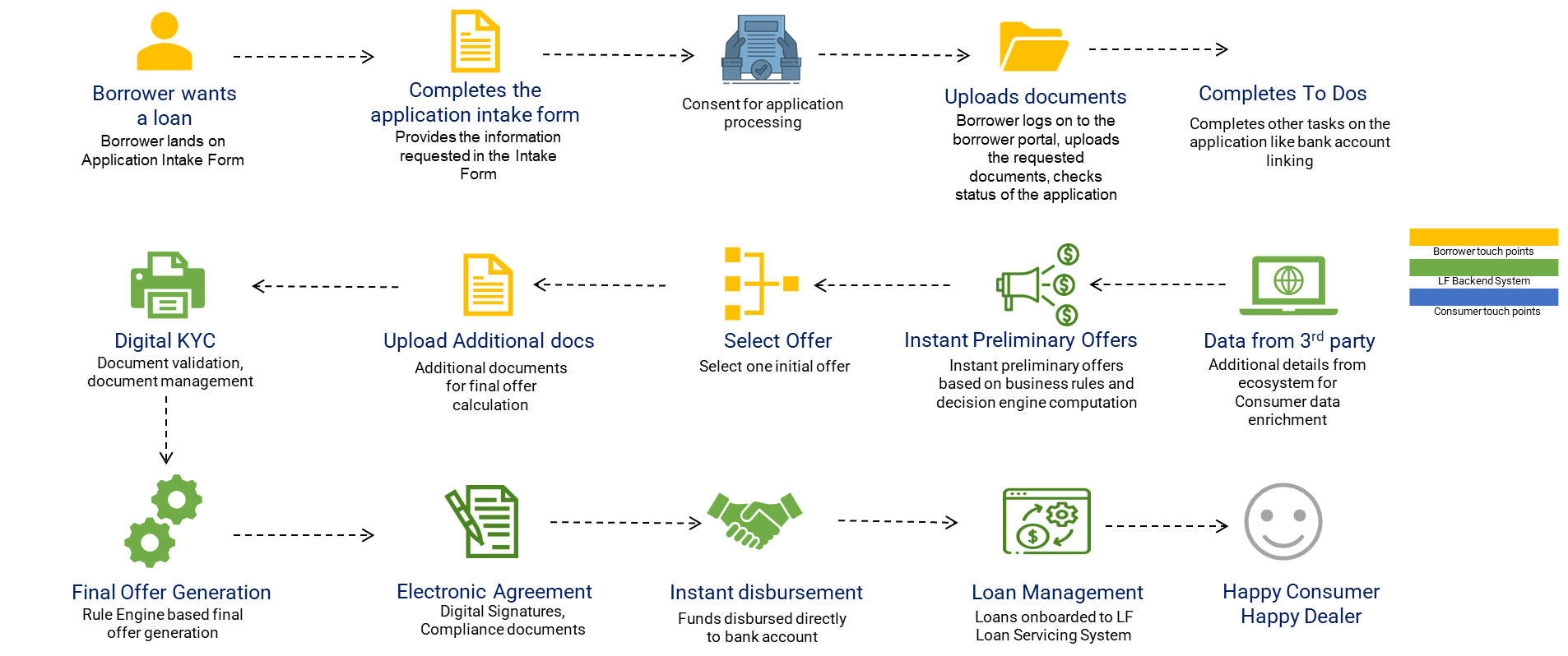
Phase 1 (Application Submission APIs):
- Submit — Borrower submits loan application
- Docs — Upload required documents
- Verify — Complete identity, income, and business verifications
- Decide — Automated or manual underwriting decision
- Approve/Decline — Final application decision
Phase 2 (Active Loan Servicing APIs):
- Onboard — Board approved loan to servicing system
- Fund — Disburse loan proceeds to borrower
- Service — Ongoing loan management and accounting
- Pay — Process borrower payments
- Payoff/Collect — Handle loan completion or collections
Phase 1: Application Submission & Approval
Application Submission APIs handle the complete loan origination process from application intake through funding approval.
Key Endpoints
| Step | Endpoint | Purpose |
|---|---|---|
| Submit | POST /borrower-application-intake | Create new application |
| Documents | POST /upload-document | Upload supporting documents |
| Verify | POST /add-stipulations | Add verification requirements |
| Credit | POST /get-credit-data | Pull credit report |
| Status | POST /get-borrower-application-by-uid | Check application status |
| Tasks | POST /create-task | Create underwriting tasks |
Authentication
Authorization: YOUR_API_KEY
No Bearer PrefixApplication Submission APIs use API Key authentication without the
Bearerprefix.
Example: Submit Application
curl -X POST "https://loc.demo.kendra.lendfoundry.com/v1/darbaan/back-office/rest/api/borrower-application-intake" \
  -H "Authorization: YOUR_API_KEY" \
  -H "Content-Type: application/json" \
  -d '{
    "borrower_name": "John Doe",
    "email": "[email protected]",
    "phone": "(555) 123-4567",
    "loan_amount": 50000,
    "loan_purpose": "Business Expansion"
  }'
const submitApplication = async (applicationData, apiKey) => {
const response = await fetch(
'https://loc.demo.kendra.lendfoundry.com/v1/darbaan/back-office/rest/api/borrower-application-intake',
{
method: 'POST',
headers: {
'Authorization': apiKey,
'Content-Type': 'application/json'
},
body: JSON.stringify(applicationData)
}
);
return await response.json();
};
const result = await submitApplication({
borrower_name: 'John Doe',
email: '[email protected]',
phone: '(555) 123-4567',
loan_amount: 50000,
loan_purpose: 'Business Expansion'
}, process.env.LOS_API_KEY);import requests
def submit_application(application_data, api_key):
"""Submit new loan application."""
url = "https://loc.demo.kendra.lendfoundry.com/v1/darbaan/back-office/rest/api/borrower-application-intake"
headers = {
"Authorization": api_key,
"Content-Type": "application/json"
}
response = requests.post(url, json=application_data, headers=headers)
response.raise_for_status()
return response.json()
result = submit_application({
"borrower_name": "John Doe",
"email": "[email protected]",
"phone": "(555) 123-4567",
"loan_amount": 50000,
"loan_purpose": "Business Expansion"
}, os.getenv('LOS_API_KEY'))public String submitApplication(String applicationJson, String apiKey) throws Exception {
HttpClient client = HttpClient.newHttpClient();
HttpRequest request = HttpRequest.newBuilder()
.uri(URI.create("https://loc.demo.kendra.lendfoundry.com/v1/darbaan/back-office/rest/api/borrower-application-intake"))
.header("Authorization", apiKey)
.header("Content-Type", "application/json")
.POST(HttpRequest.BodyPublishers.ofString(applicationJson))
.build();
HttpResponse<String> response = client.send(request,
HttpResponse.BodyHandlers.ofString());
return response.body();
}The Handoff: LOS to LMS
When an application is approved, it must be "boarded" to the Active Loan Servicing system. This is the critical transition point between origination and servicing.
Boarding Endpoint
POST /application/submit/business/onboardFull URL:
https://api.demo.lms.lendfoundry.com/v1/lms-application-processor/application/submit/business/onboardData Transferred
| Category | Data Elements |
|---|---|
| Borrower Info | Name, SSN/EIN, contact details, address |
| Loan Terms | Amount, rate, term, purpose |
| Collateral | Type, value, description |
| Documents | Document references and verification status |
Boarding Example
curl -X POST "https://api.demo.lms.lendfoundry.com/v1/lms-application-processor/application/submit/business/onboard" \
  -H "Authorization: Bearer YOUR_JWT_TOKEN" \
  -H "Content-Type: application/json" \
  -d '{
    "application_uid": "0x1234567890abcdef",
    "application_number": "APP-2025-001234",
    "loan_amount": 50000,
    "interest_rate": 5.5,
    "loan_term": 60,
    "loan_start_date": "2025-12-20"
  }'
const boardLoan = async (boardingData, jwtToken) => {
const response = await fetch(
'https://api.demo.lms.lendfoundry.com/v1/lms-application-processor/application/submit/business/onboard',
{
method: 'POST',
headers: {
'Authorization': `Bearer ${jwtToken}`,
'Content-Type': 'application/json'
},
body: JSON.stringify(boardingData)
}
);
return await response.json();
};
const result = await boardLoan({
application_uid: '0x1234567890abcdef',
application_number: 'APP-2025-001234',
loan_amount: 50000,
interest_rate: 5.5,
loan_term: 60,
loan_start_date: '2025-12-20'
}, jwtToken);import requests
def board_loan(boarding_data, jwt_token):
"""Board approved loan to LMS."""
url = "https://api.demo.lms.lendfoundry.com/v1/lms-application-processor/application/submit/business/onboard"
headers = {
"Authorization": f"Bearer {jwt_token}",
"Content-Type": "application/json"
}
response = requests.post(url, json=boarding_data, headers=headers)
response.raise_for_status()
return response.json()
result = board_loan({
"application_uid": "0x1234567890abcdef",
"application_number": "APP-2025-001234",
"loan_amount": 50000,
"interest_rate": 5.5,
"loan_term": 60,
"loan_start_date": "2025-12-20"
}, jwt_token)public String boardLoan(String boardingJson, String jwtToken) throws Exception {
HttpClient client = HttpClient.newHttpClient();
HttpRequest request = HttpRequest.newBuilder()
.uri(URI.create("https://api.demo.lms.lendfoundry.com/v1/lms-application-processor/application/submit/business/onboard"))
.header("Authorization", "Bearer " + jwtToken)
.header("Content-Type", "application/json")
.POST(HttpRequest.BodyPublishers.ofString(boardingJson))
.build();
HttpResponse<String> response = client.send(request,
HttpResponse.BodyHandlers.ofString());
return response.body();
}Boarding Response
{
  "loan_number": "LN-2025-001234",
  "status": "boarded",
  "message": "Loan successfully boarded to LMS",
  "loan_id": "12345",
  "boarded_at": "2025-12-15T10:30:00Z",
  "application_uid": "0x1234567890abcdef",
  "application_number": "APP-2025-001234"
}
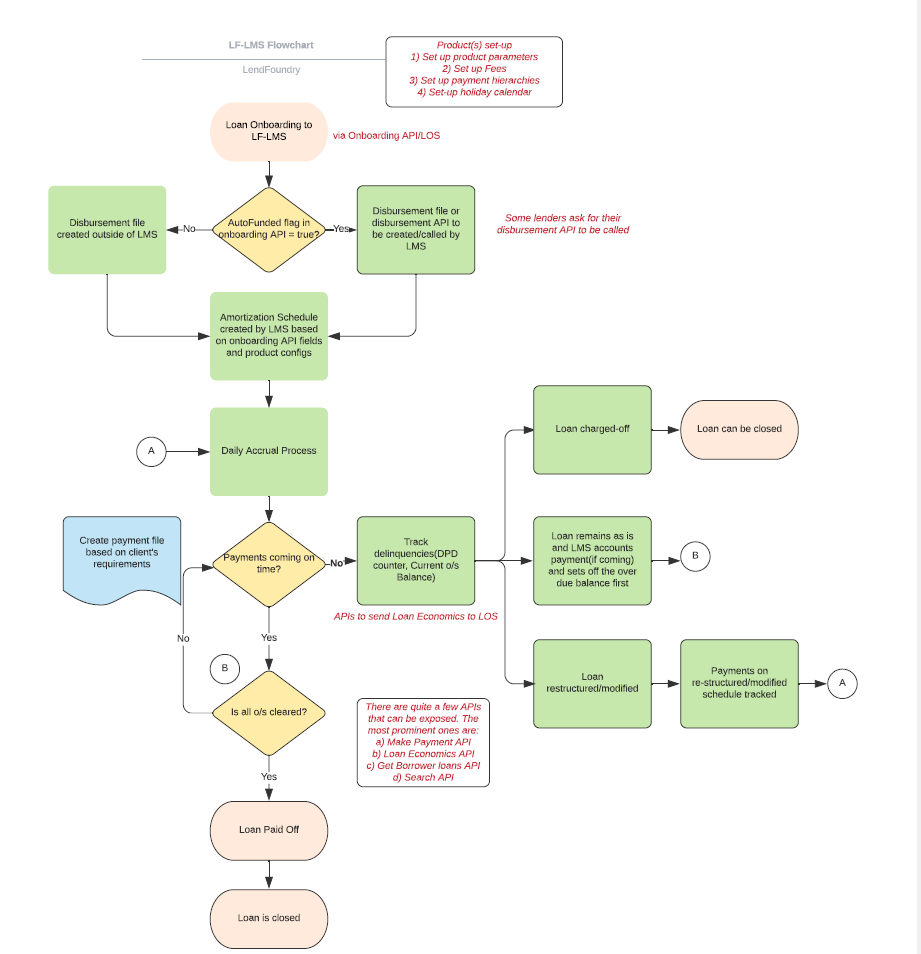
Phase 2: Active Loan Servicing
Active Loan Servicing APIs handle all post-origination activities including payment processing, accounting, and collections.
Microservices Architecture
%%{init: {'theme': 'base', 'themeVariables': {'background': '#ffffff', 'mainBkg': '#ffffff', 'clusterBkg': '#f9fafb', 'clusterBorder': '#2563eb', 'primaryColor': '#2563eb', 'primaryTextColor': '#ffffff', 'titleColor': '#000000', 'lineColor': '#374151'}, 'flowchart': {'padding': 25, 'nodeSpacing': 40, 'rankSpacing': 50}}}%%
flowchart TB
    subgraph LMS[💰 Active Loan Servicing Microservices]
        direction TB
        A[🏦 Loan Management] --> B[💳 Payment Processor]
        A --> C[📊 Loan Accounting]
        B --> C
        A --> D[👤 Business Applicant]
        A --> E[🔍 Loan Filters]
        A --> F[💵 DrawDown Processor]
        B --> G[📞 Call Management]
    end

    style A fill:#2563eb,stroke:#1e40af,color:#fff
    style B fill:#2563eb,stroke:#1e40af,color:#fff
    style C fill:#2563eb,stroke:#1e40af,color:#fff
    style D fill:#2563eb,stroke:#1e40af,color:#fff
    style E fill:#2563eb,stroke:#1e40af,color:#fff
    style F fill:#2563eb,stroke:#1e40af,color:#fff
    style G fill:#d97706,stroke:#b45309,color:#fff
Key Endpoints by Microservice
| Microservice | Endpoint | Purpose |
|---|---|---|
| Loan Management | POST /onboard | Create new loan record |
| Loan Management | POST /amortize | Generate amortization schedule |
| Loan Management | GET /search/{loanNumber}/details | Get loan details |
| Payment Processor | POST /payment | Process payment |
| Loan Accounting | POST /transaction | Record transaction |
| Loan Accounting | GET /balance/{loanNumber} | Get current balance |
| DrawDown Processor | POST /process-drawdown | Process LOC draw |
| Call Management | POST /loan/{entityId} | Add Call Notes |
| Loan Filters | POST /filter-loans | Search/filter loans |
Authentication
Authorization: Bearer YOUR_JWT_TOKEN
Bearer Prefix RequiredActive Loan Servicing APIs require the
Bearerprefix before the JWT token.
Loan Status Flow
Integration Best Practices
✅ DO
| Practice | Reason |
|---|---|
| Verify prerequisites before boarding | Prevents boarding failures |
| Implement webhook listeners | Real-time status updates |
| Use idempotency keys | Prevent duplicate operations |
| Validate data before submission | Reduce validation errors |
| Log all API interactions | Audit trail and debugging |
❌ DON'T
| Anti-Pattern | Risk |
|---|---|
| Skip status verification | Operations on invalid states |
| Ignore error responses | Silent failures |
| Hardcode credentials | Security exposure |
| Poll excessively | Rate limiting |
Data Linking
Applications and loans are linked through unique identifiers:
%%{init: {'theme': 'base', 'themeVariables': {'background': '#ffffff', 'mainBkg': '#ffffff', 'clusterBkg': '#f9fafb', 'clusterBorder': '#2563eb', 'primaryColor': '#2563eb', 'primaryTextColor': '#ffffff', 'titleColor': '#000000', 'lineColor': '#374151'}, 'flowchart': {'padding': 25, 'nodeSpacing': 60, 'rankSpacing': 50}}}%%
flowchart LR
    subgraph LINK[🔗 Data Linking]
        A[📋 APP-2025-001] -.->|Links To| B[💰 LN-2025-001]
    end

    style A fill:#2563eb,stroke:#1e40af,color:#fff
    style B fill:#059669,stroke:#047857,color:#fff
| LOS Field | LMS Field | Purpose |
|---|---|---|
application_uid | appRefId | Unique application identifier |
application_number | applicationNumber | Human-readable application ID |
| — | loanNumber | Unique loan identifier (created at boarding) |
Key Takeaways
| Concept | Details |
|---|---|
| Two Systems | LOS for origination, LMS for servicing |
| Different Auth | LOS uses API Key, LMS uses Bearer JWT |
| Handoff Point | POST /application/submit/business/onboard |
| Data Linking | application_uid links LOS and LMS records |
| Microservices | LMS has 7+ microservices for different functions |
Next Steps
| Resource | Description |
|---|---|
| Workflows | Detailed workflow guides |
| Error Codes | Handle errors gracefully |
| Rate Limiting | Understand rate limits |
Ready to Build?Explore the Workflow Guides for step-by-step implementation examples.